Hosts & connections
The host editor
Press ⌘N for a new host, or tap an existing host to edit it. The editor has four tabs — connection, advanced, forwarding, snippets — and a connect bar. On iPhone the same four sections appear as chips — connection, advanced, tunnels, snippets — where connection fields and tunnel rules are staged until you tap save (other edits apply immediately, as on iPad); the editor is the same on both devices.
The connection tab holds the basics: name, address, port (1–65535), user, identity (a key from your keys page), and password. A password you type here is session-scoped: it's kept only for the live session and never persisted. The one exception is a host set up through nearby setup or continuity that authenticates by password — the password you type once on the new device is kept as a saved credential in this device's keychain, never synced, and the editor can change it later (saving replaces the stored password).
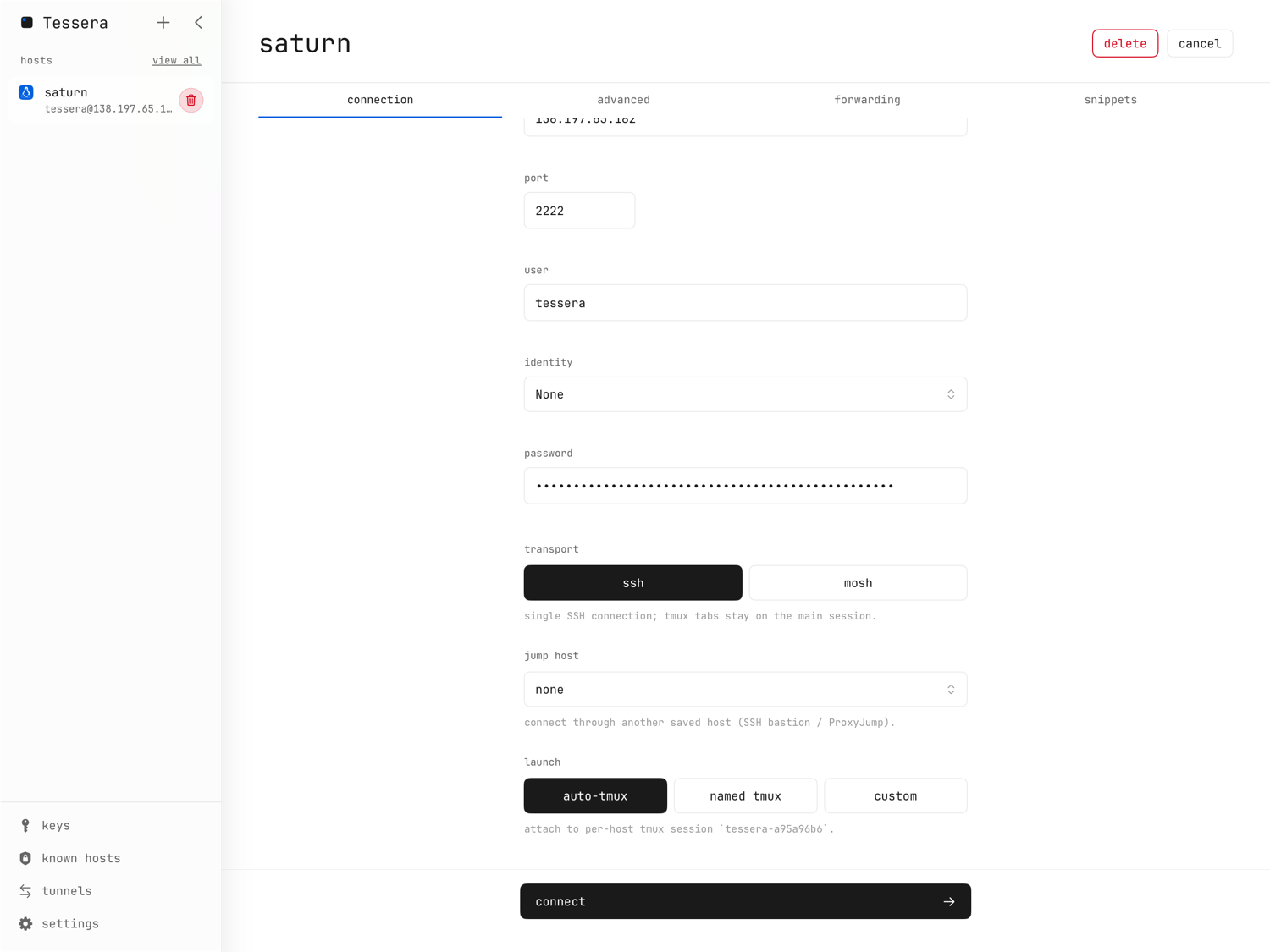
Transport: SSH or Mosh
Each host picks one transport:
- ssh — a single SSH connection; tmux tabs stay on the main session.
- mosh — a mosh terminal over UDP. Mosh keeps your session alive across
Wi-Fi ↔ cellular roaming and sleep/wake, and feels snappier on lossy links.
It requires
mosh-serverinstalled on the host. tmux tabs use a second SSH side channel. The mosh page has the full story, including real scrollback.
Mosh's UDP traffic cannot traverse bastions: if you use mosh through a jump host and the mosh server is unreachable, Tessera tells you ("mosh is unreachable through the jump chain…") and reconnects over SSH.
Launch modes
- auto-tmux — attach to (or create) a per-host tmux session with a
deterministic
tessera-XXXXXXXXname, remembered across app reinstalls. The default, and the one that makes dropped connections harmless. - named tmux — attach to a tmux session name you choose; names with invalid characters fall back to the auto-derived one.
- custom — a verbatim launch command. Over ssh it's sent to the login
shell; over mosh it's run by
mosh-server new -- <command>.
See tmux for what the tmux modes give you, and port forwarding for how the launch mode interacts with tunnels.
Jump hosts
Any saved host can be used as an SSH bastion (ProxyJump): pick it in the host editor. Chains nest — the jump host's own jump host extends the chain — and the editor shows the resulting path ("a → b → host") with warnings for broken chains.
- Each hop authenticates independently with its own identity or password. Password hops get a password · <hop name> field in the editor's jump-host section, kept only for the live session; connect stays disabled until every hop has one.
- Host-key prompts appear per hop, bastion first, each naming the endpoint being verified.
- A broken chain fails closed: if a jump host was deleted, the dependent host warns in its editor and the connection fails rather than silently going direct. Errors name the hop they came from ("jump host <name>: …").
- On the free tier, a separately saved bastion uses a saved-host slot of its own.
Advanced tab
- os logo — auto-detected on connect, or set manually (macos, ubuntu, debian, alpine, linux, raspbian).
- tags and notes — for your own organization.
- environment variables — one
KEY=valueper line; an optional leadingexportis stripped. Values are passed to the remote shell verbatim —$HOME,$(…), and quotes work as written. - terminal background — a per-host override of the global background.
Environment variables and startup snippets only run when the tmux session starts. If you change them for a host whose tmux session already exists, kill that session on the server to pick up the changes.
Snippets
The snippets tab holds a startup snippet: commands sent immediately after connecting (the same tmux caveat above applies).
When a connection stalls
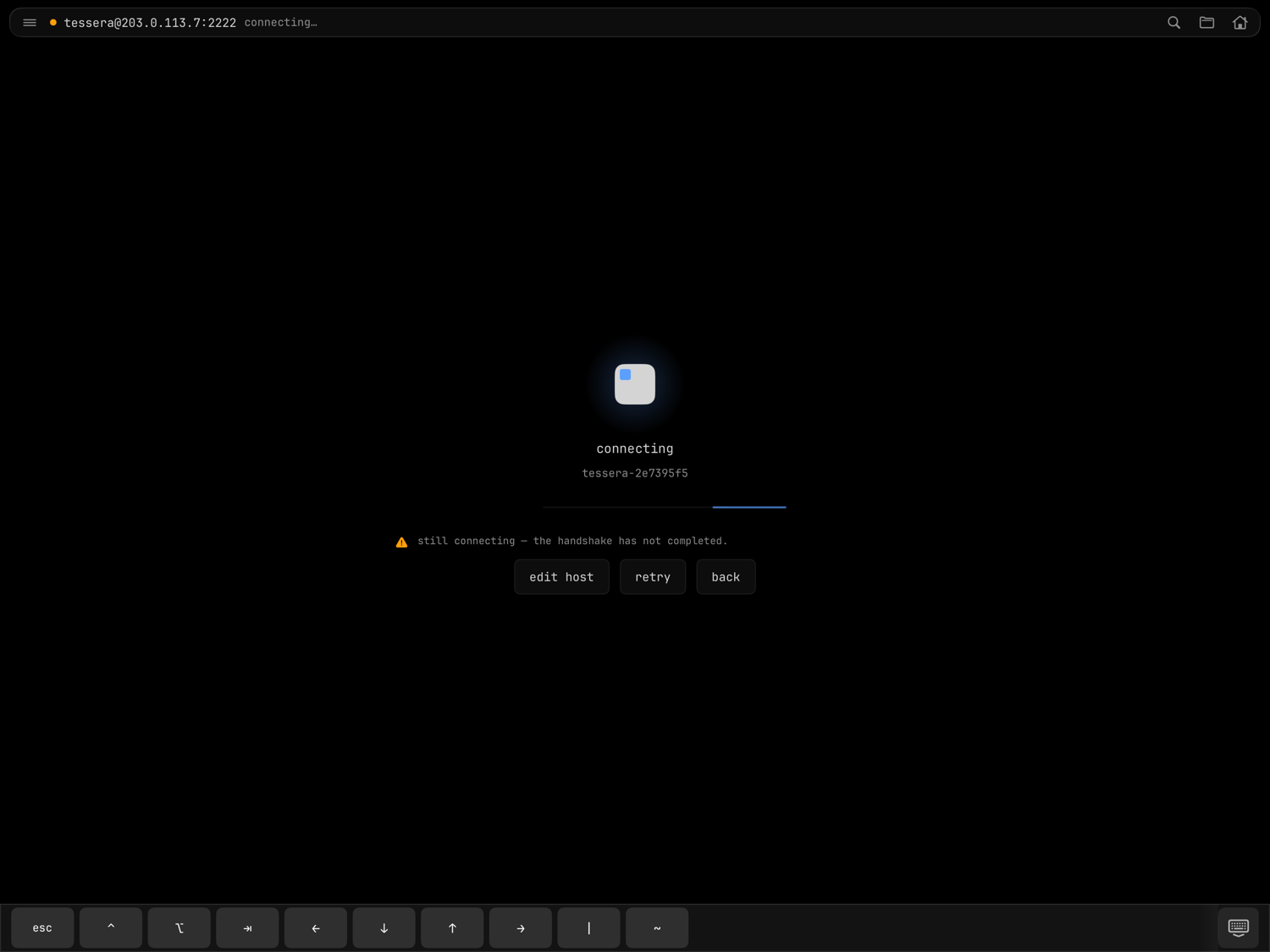
While a session comes up, the launch overlay names the stage it's in — connecting, then for tmux hosts starting tmux (SSH) or attaching tmux (mosh), then attaching pane. If one stage makes no progress for about twelve seconds, the overlay says which stage is stuck ("still connecting — the handshake has not completed.") and offers a way out instead of spinning:
- edit host — open the host editor, for when the address, port, or key is the problem,
- retry — tear the attempt down and reconnect from scratch,
- back — give up and return to your hosts. Backing out of a stalled attempt disconnects it fully — nothing is left running on the server.
The timer is per stage, so a slow connection that's still advancing never trips it. If tmux itself can't come up — it isn't installed, the session can't start, or the host's own dotfiles already launch tmux at login — Tessera drops you into a plain shell with a banner saying exactly what happened, rather than waiting on a tmux that will never answer.
Sessions
Tessera keeps multiple concurrent sessions open to any hosts. Auto-tmux hosts are singletons — one tmux control session per host (per host and session name for named tmux) — while custom-command hosts can have several ("name #2", "name #3"). The sidebar's active section lists every session, labeled "name (tmux)", "name (tmux: session-name)", or "name #N", each with a disconnect button. On iPhone the same list is the sessions tab.
Switch between sessions by tapping them, walking neighbors with ⌘⇧K /
⌘⇧J, or opening the ⌘K quick-switch palette: type to filter sessions
(most-recent first) and agents — prefix the query with @ to scope to agents.
Session restore
settings → terminal → startup → previous connections controls what happens on a fresh launch:
- ask — shows a "reopen previous connections" sheet with "always reopen" / "reopen" / "not now".
- always — reconnects silently.
- never — starts clean.
On iPhone the chooser sheet is replaced by a single restore on launch toggle. Only saved-host sessions with intact key material are restorable.
Coming back to the foreground works the same way but smarter: Tessera waits for every open session to report its state before deciding what to reconnect, so when several hosts drop at once — or a mosh session admits only belatedly that it died — each one is reconnected, none stranded. While that happens, the launch overlay counts the rest ("+2 more sessions reconnecting"). Tessera is deliberately single-window (no multi-scene on iPad); the sidebar and the palette — the tab bar and the switcher on iPhone — are how you move around.