Agent center
The agent center gathers your Claude Code and Codex sessions from across every connection — tmux windows, panes, and raw sessions — onto one page, and lets you answer their prompts without hunting for the right pane. It's experimental and off by default: enable it in settings → experimental → agent center. Turning it off later does not uninstall host hooks.
Open it from the sidebar's agents entry (on iPhone, behind the sessions tab's selector — the tab is badged when agents need you), with ⌘⇧A, or from the top-bar attention button that appears when agents are waiting. When an agent is waiting in the focused pane, the swipe pad also surfaces its options as petals.
The agents page
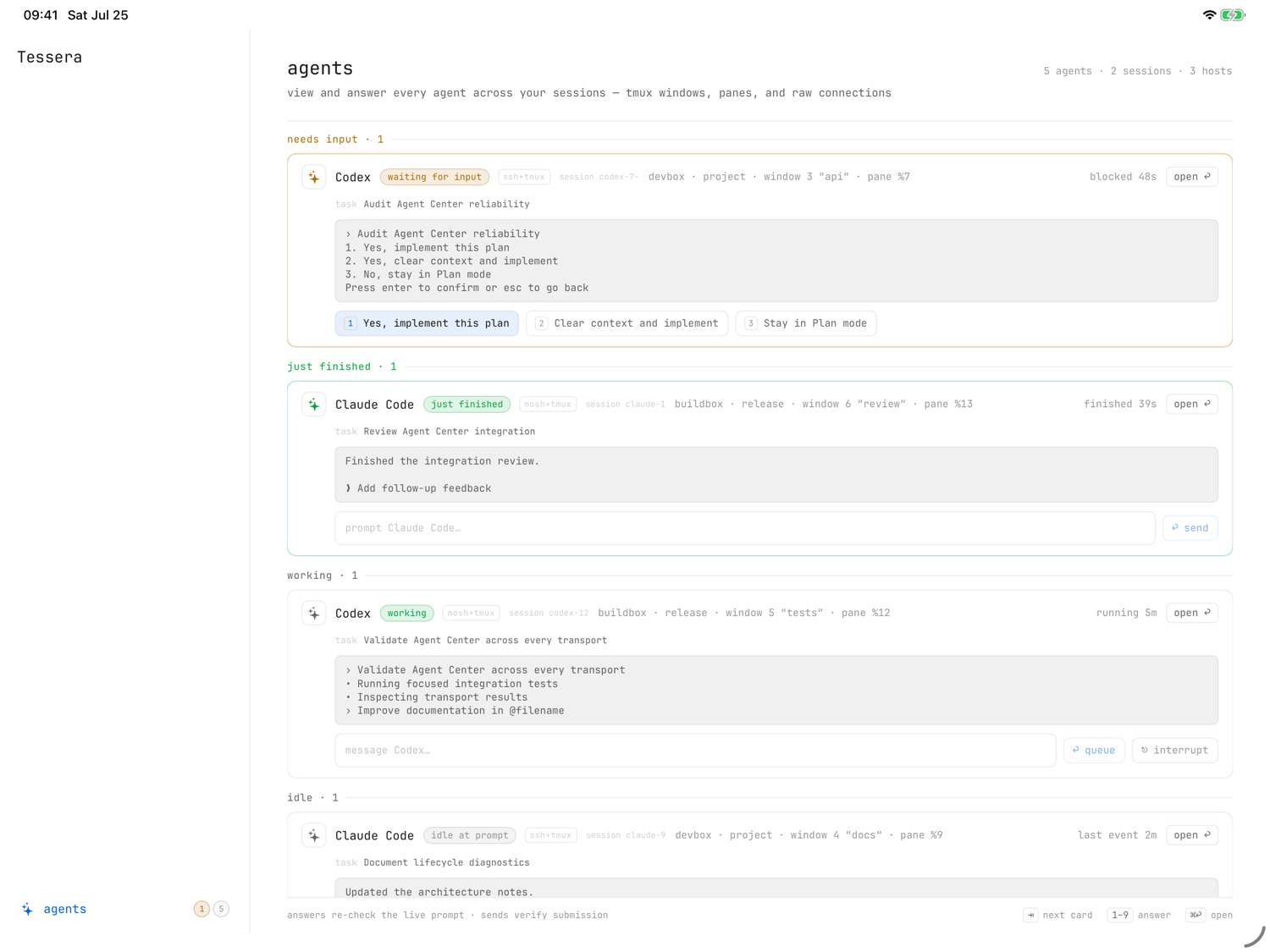
Cards are grouped by status — needs input, just finished, working, idle, status unavailable — under a summary line ("N agents · N sessions · N hosts") and an "agents need attention / all caught up" banner.
Each card shows the agent's current prompt. From a card you can:
- press ⇥ to move between cards and 1–9 to pick a numbered option,
- ⌘↩ open — jump straight to that pane,
- type in the message field — "message <name>…" queues, "prompt <name>…" sends immediately,
- interrupt the agent.
Answers re-check the live prompt before being sent, and sends verify submission — so you never answer a question the agent already moved past. While an agent streams output in the terminal itself, scrolling is briefly locked so a stray flick doesn't drag you up mid-run — if you'd rather scroll freely, settings → terminal → agent scroll lock turns the freeze off per provider (claude code and codex, both on by default). Detection, cards, and notifications are unaffected.
How detection works
Baseline detection is heuristic, read from terminal text, using the same grammars as swipe pad profiles (built-in Claude Code and Codex grammars, plus any custom profiles you define).
For precise status, Tessera offers an opt-in, per-host agent status hook: a terminal exposes process presence and pixels, but not whether an agent is computing, idle, or blocked — the agents' own lifecycle hooks are the authoritative signal. Without it, cards read status unavailable and the center only discovers agents; it never guesses their state.
Installing the hook (from an unavailable card, or the amber top-bar warning)
always shows exactly what it will change first: it places Tessera-owned files
under ~/.config/tessera on the server, merges only Tessera's handlers into
the Claude Code and Codex user configs — never rewriting your existing
aliases, functions, or unrelated hooks — and adds one guarded sourcing line
to .zshrc / .bashrc (marked # TESSERA-AGENT-LIFECYCLE). What it emits
back is status metadata only — provider, lifecycle event, state, reason,
session/turn identifiers, notification type, permission mode, timestamp, and
local process ID — never prompts, responses, source code, or credentials.
Worth knowing after an install:
- A shell has to load it — open a new shell or tmux window (Tessera offers to do this at an empty prompt, and only there).
- Codex keeps its own hook-trust boundary: the first integrated launch may
ask you to review the hook via
/hooks. - The page tracks the hook's state per host — not installed, active, inactive here, or outdated — repairs a broken integration automatically, and offers update status hook when a newer version ships. On plain mosh, checking may need a key unlock, so Tessera waits for a check now tap instead of polling.
Attention notifications
With agent attention notifications enabled, Tessera posts an iOS banner — "<host> · <window>", "Claude Code needs input", "… just finished" — when an off-screen agent finishes or needs you while Tessera is backgrounded. Tapping the banner routes straight to the right pane.
- Enabling this turns terminal-bell background notifications off once; the agent channel is the more precise one.
- iOS may suspend longer sessions in the background, so delivery on very long-running sessions is best-effort.